How to Setup a Google My Business Profile (Google Business Profile) – Elite Online Marketing
Filed under: Resources
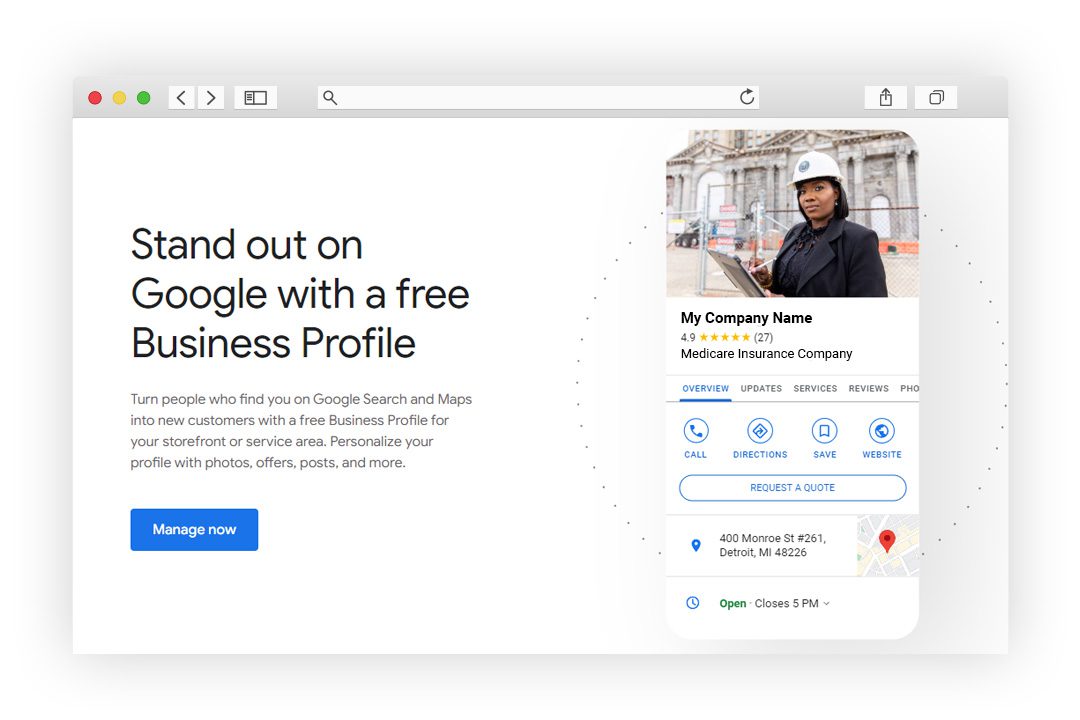 How to Setup a Google My Business Account:
A Step-by-Step Guide to creating your Google business profile.
Setting up your business on Google My Business is an essential part of any digital marketing strategy. It is a free tool that helps businesses manage their online presence across Google, including search and maps. With Google My Business, you can create and update your business information, interact with customers, and monitor how your business is performing on Google.
To get started, the first step is to create a Google My Business account. You can do this by signing in to your Google account or creating a new one. Once you have created your account, you can add your business information, such as your business name, address, phone number, and website. This information will appear on Google search and maps, making it easier for customers to find you.
After creating your account and adding your business information, the next step is to verify your business. Google will send a verification code to your business address, which you will need to enter in your Google My Business account. Once your business is verified, you can optimize your business profile by adding photos, videos, and posts to showcase your business and attract more customers. You can also manage customer reviews and utilize other Google My Business features to enhance your online presence.
Key Takeaways
- Google My Business is a free tool that helps businesses manage their online presence across Google search and maps.
- To get started, create a Google My Business account, add your business information, and verify your business.
- Optimize your business profile, manage customer reviews, and utilize Google My Business features to enhance your online presence and attract more customers.
Understanding Google My Business
Google My Business is a free tool that allows businesses to manage their online presence across Google, including Search and Maps. It is an essential tool for local businesses to connect with customers and improve their online visibility. In this section, we will provide an overview of Google My Business and explain how it works.
What is Google My Business?
Google My Business is a platform that allows businesses to create and manage their online presence on Google. It provides businesses with a free listing that appears in Google Search and Maps, making it easier for customers to find them. The listing includes important information such as the business name, address, phone number, website, hours of operation, and customer reviews.
How does Google My Business work?
To get started with Google My Business, you need to create a Google account and claim your business listing. Once you have claimed your listing, you can add or edit information about your business, such as your address, phone number, website, and hours of operation. You can also add photos and videos to showcase your business and attract more customers.
Google My Business also allows businesses to interact with customers by responding to reviews and messages. This is a great way to build relationships with customers and improve your online reputation.
Why is Google My Business important?
Google My Business is important for local businesses because it helps them connect with customers and improve their online visibility. By creating a Google My Business listing, businesses can appear in Google Search and Maps, making it easier for customers to find them. This can lead to increased website traffic, phone calls, and foot traffic to their physical location.
In addition, Google My Business allows businesses to manage their online reputation by responding to customer reviews and messages. This can help improve customer satisfaction and attract new customers.
Overall, Google My Business is an essential tool for local businesses to manage their online presence and connect with customers. By creating a Google My Business listing, businesses can improve their online visibility and attract more customers to their physical location.
Benefits of having a Google My Business profile
Having a Google My Business profile offers numerous benefits for your business. Firstly, it increases your visibility on Google. When someone searches for a business that matches your industry or keywords, your listing will appear in the search results, making it easier for potential customers to find you.
Secondly, it allows you to provide essential information about your business, such as your address, phone number, and business hours. This information is displayed prominently on your Google My Business profile, making it convenient for customers to find and contact you.
Additionally, Google My Business enables customers to leave reviews and ratings for your business, which can help build trust and credibility. Positive reviews can also influence potential customers to choose your business over your competitors.
How to create a Google My Business account
Creating a Google My Business account is a straightforward process. Here's a step-by-step guide to get you started:
Step 1:
If you already have a Google account, go to the Google My Business website and log in. If you don't have a Google account, you need to create one first. Simply go to the Google homepage and click on the "Sign In" button. From there, you can sign up for a new account.
Step 2:
Once you're logged in to your Google account, go to the Google My Business website and click on the "Manage Now" button. This will take you to the setup process for your business profile.
Step 3:
Enter the name of your business in the provided field. Make sure to use your official business name to avoid confusion among customers. If there are multiple businesses with the same name, you may need to add location information to differentiate your business.
Step 4:
Next, you'll be asked to select a business category that best represents your industry. This will help Google understand the nature of your business and display it correctly in search results.
Step 5:
Enter your business address and contact information. It's crucial to provide accurate and up-to-date information so that customers can easily reach you. This will also help Google verify your business during the verification process.
How to claim your business profile on Google
If you've already created a Google My Business profile but haven't claimed it yet, it's important to do so to gain full control over your business information. Here's how you can claim your business profile:
Step 1:
Go to the Google My Business homepage and click on the "Own this business?" link. This will let Google know that you are the owner or authorized representative of the business.
Step 2:
Sign in to your Google account if you haven't already done so. You will be asked to provide additional details to verify your ownership, such as your business address and contact information.
Step 3:
Once you've completed the verification process, you'll have full control over your business profile on Google. You can update and optimize your profile to ensure that it accurately represents your business and attracts potential customers.
How to Setup Your Google Business Profile
Now that you have created and claimed your Google My Business profile, it's time to set it up to maximize its benefits. Here's a step-by-step guide to help you through the process:
Step 1:
After logging in to your Google My Business account, click on the "Info" tab on the left-hand side of the dashboard. This is where you can add and edit information about your business.
Step 2:
Start by adding your business hours. Provide the days and times when your business is open to ensure that customers know when they can visit or contact you. You can also add special hours for holidays or other occasions.
Step 3:
Next, you can add your services or products to give potential customers an idea of what your business offers. Be specific and provide detailed descriptions to attract the right audience.
Step 4:
Take advantage of the attributes section to highlight unique features or amenities your business offers, such as free Wi-Fi, wheelchair accessibility, or outdoor seating.
Step 5:
Upload high-quality photos of your business, including your logo, interior and exterior shots, and product images. Visual content can greatly impact a customer's decision to choose your business.
Verifying your business on Google
Verifying your business on Google is crucial to ensure that your business information is accurate and to establish trust with potential customers. Here's what you need to do to verify your business:
Step 1:
From your Google My Business dashboard, click on the "Verify Now" button. This will initiate the verification process.
Step 2:
Depending on your business location and preferences, you can choose to verify your business by mail, phone, email, or instant verification if you've already verified your website with Google Search Console. Follow the instructions provided by Google for your chosen verification method.
Step 3:
Once your business is verified, you'll have access to additional features on your Google My Business profile, such as posting updates, accessing insights, and responding to customer reviews.
How to Optimize Your Google My Business Profile
Optimizing your Google My Business profile is crucial to rank higher in search results and attract more customers. Here are some key areas to focus on for optimization:
Adding your business hours and services
As mentioned earlier, adding your business hours and services is essential. Make sure to keep this information updated and accurate to avoid any confusion for potential customers.
Using Google My Business to improve your search visibility
Google My Business provides various features that can improve your search visibility, such as adding keywords to your business description and posts, engaging with customers through messaging, and using Google Q&A to address common queries.
Responding to customer reviews on your Google Business Profile
Customer reviews play a significant role in your business's online reputation. Take the time to respond to both positive and negative reviews in a professional and courteous manner. This shows potential customers that you value their feedback and are committed to providing excellent customer service.
Understanding the Importance of Google Maps for Your Business
Google Maps is an integral part of Google My Business and plays a crucial role in driving foot traffic to your business. Here's why it's important:
How Google Maps can drive foot traffic to your business
When potential customers search for a business on their mobile devices, Google Maps is often the first place they turn to. By having a strong presence on Google Maps, you increase your chances of attracting customers who are already in your vicinity and actively looking for the products or services you offer.
Creating a Google Maps listing for your business
To create a Google Maps listing for your business, make sure your business information is accurate and up to date on your Google My Business profile. Google uses the information provided to create your listing on Google Maps.
Optimizing your business information on Google Maps
Optimizing your business information on Google Maps involves ensuring that your address, phone number, website, and other details are correct. Additionally, encourage customers to leave reviews on Google Maps, as positive reviews can further boost your business's visibility.